Visualizing Innovation: A Deep Dive into the 3D Printing Workflow and Digital Assets
In the rapidly evolving landscape of modern manufacturing and digital creativity, few technologies have captured the public imagination quite like three-dimensional printing. What was once a niche industrial process reserved for prototyping in high-end laboratories has become a cornerstone of hobbyist culture, educational curricula, and small business operations. However, understanding the mechanics behind this technology can often feel daunting to beginners. This is where visual communication plays a pivotal role. By utilizing a comprehensive 3D Printing Icon Collection, we can demystify the complex steps involved in additive manufacturing, transforming abstract technical concepts into clear, approachable visuals.
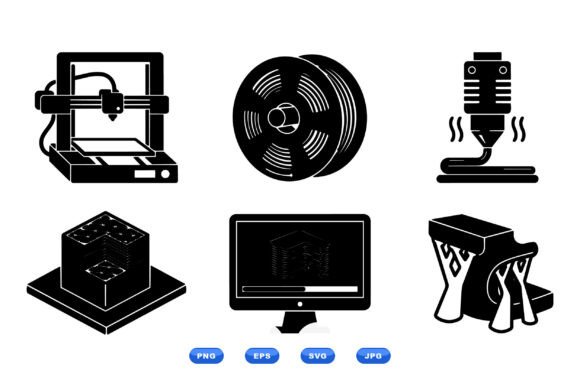
This article explores the significance of the 3D printing workflow, breaking down each stage from the initial digital design to the final physical object. We will examine how a set of flat vector icons—depicting essential elements like the printer nozzle, filament spool, build platform, and slicing software—serves as an invaluable tool for educators, designers, and businesses. Furthermore, we will discuss the practical relevance of having these assets available in versatile formats such as SVG, EPS, PNG, and JPG, ensuring they fit seamlessly into both professional print and digital workflows.
The Anatomy of Additive Manufacturing
To truly appreciate the utility of a visual icon set, one must first understand the process it represents. 3D printing, technically known as additive manufacturing, is not a single action but a sequence of coordinated events. A clean, black-and-white vector set with sharp contours helps isolate these specific components, allowing viewers to focus on function without the distraction of unnecessary detail.
1. The Digital Blueprint and Slicing Software
Every 3D print begins in the virtual realm. Before any plastic is melted or resin is cured, a designer creates a 3D model using Computer-Aided Design (CAD) software. However, the printer cannot read a raw 3D model directly. This is where slicing software comes into play. This critical piece of technology takes the 3D model and "slices" it into hundreds or thousands of thin horizontal layers, generating the G-code instructions that tell the printer exactly where to move.
In an educational context, representing this step with a dedicated icon of a computer running slicing software clarifies a common misunderstanding: that the printer simply "knows" what to make. Visualizing this step emphasizes the importance of digital preparation and parameter setting, such as layer height and infill density.
2. The Filament Spool and Material Science
Once the code is generated, the physical materials come into focus. For Fused Deposition Modeling (FDM), the most common type of consumer 3D printing, the primary material is thermoplastic wound around a filament spool. Whether it is PLA (polylactic acid), ABS, or PETG, the choice of material dictates the strength, flexibility, and finish of the final product.
An icon depicting a filament spool serves as a universal symbol for the raw input of the manufacturing process. It reminds users that 3D printing is a subtractive-free process; unlike carving wood or milling metal, you are adding material only where it is needed. This distinction is fundamental to understanding the efficiency and sustainability potential of the technology.
3. The Nozzle and Build Platform
The heart of the operation lies in the interaction between the printer nozzle and the build platform. The nozzle heats the filament to its melting point and extrudes it with microscopic precision onto the build platform. The platform acts as the foundation, often heated to prevent warping as the object grows layer by layer.
Visualizing these two components together highlights the mechanical dance of 3D printing. The nozzle moves along the X and Y axes while the platform lowers on the Z-axis (or vice versa), slowly constructing a three-dimensional object from nothing but a series of stacked two-dimensional slices. For beginners, seeing these distinct parts represented in a flat vector style helps them visualize the mechanical limitations and capabilities of their machines.
The Power of Scalable Vector Graphics in Education and Business
Why is the format of these icons so important? In the world of digital design and technical documentation, scalability is king. A downloadable ZIP package that includes SVG (Scalable Vector Graphics) and EPS (Encapsulated PostScript) files offers unparalleled flexibility. Unlike raster images (like standard photos) which become pixelated when enlarged, vector files use mathematical paths to define shapes. This means a tiny icon of a printer nozzle can be blown up to the size of a billboard without losing any sharpness or clarity.
This feature is particularly vital for:
- Educational Materials: Teachers creating worksheets, presentations, or textbook diagrams need images that remain crisp whether printed on a small handout or projected on a large screen.
- Technical Manuals: Manufacturers require precise illustrations for user guides. A clean black-and-white vector set ensures that instructions are legible even in low-light conditions or when printed in grayscale.
- Web and App Development: With the inclusion of PNG and JPG formats alongside vectors, developers can easily integrate these icons into websites, mobile apps, and user interfaces, ensuring fast loading times and consistent branding.
The decision to design these icons as a clean black-and-white vector set is also strategic. Color can sometimes distract from the structural form of an object. By stripping away color, the viewer focuses entirely on the geometry and function of the component. This minimalist approach aligns with modern design trends and ensures the icons are versatile enough to be colored later to match any brand identity or thematic requirement.
Bridging the Gap Between Concept and Reality
The significance of visualizing the 3D printing workflow extends beyond mere aesthetics; it fosters a deeper comprehension of technology. In classrooms, students often struggle to connect the dots between the code on a screen and the plastic object in their hands. A sequential set of icons acts as a storyboard, guiding them through the narrative of creation.
Consider a scenario in a makerspace or a STEM classroom. An instructor uses a diagram featuring the computer slicing software, the filament spool, and the printer nozzle to explain why a print failed. Perhaps the filament ran out, or the nozzle was clogged. By pointing to the specific icon representing the problem area, the instructor can quickly diagnose the issue without getting bogged down in complex jargon. This visual shorthand accelerates the learning curve and empowers students to troubleshoot independently.
Similarly, in the business sector, companies offering 3D printing services use these visuals to manage client expectations. A flowchart utilizing these icons can explain to a client why a certain design requires support structures or why a specific material is chosen for durability. It transforms a potentially confusing technical consultation into a transparent, collaborative conversation.
Common Misunderstandings Clarified
One of the most persistent myths about 3D printing is that it is a "magic box" that can instantly create anything. A detailed workflow visualization dispels this myth by highlighting the preparatory work involved. It shows that the build platform must be leveled, the slicing software must be configured correctly, and the filament must be of high quality. By breaking the process down into discrete, visual steps, we emphasize that successful 3D printing is a skill based on knowledge and precision, not just automation.
Another assumption is that 3D printing is solely for plastic toys. While the filament spool icon often suggests plastic, the workflow principles apply equally to metal printing, resin curing, and even bioprinting. The icons serve as a foundational metaphor for the broader category of additive manufacturing, adaptable to various contexts as the technology evolves.
Conclusion: The Value of Clear Visual Communication
As 3D printing continues to permeate our daily lives, from custom prosthetics to architectural models, the need for clear, accessible information grows. A high-quality 3D Printing Icon Collection is more than just a set of graphics; it is an educational toolkit. By providing a visual language that transcends barriers of age and expertise, these assets help democratize understanding of advanced manufacturing.
Whether you are a graphic designer looking for the perfect asset for a tech blog, an educator building a curriculum for the next generation of engineers, or a business owner streamlining your documentation, the utility of a fully scalable, multi-format vector set cannot be overstated. The ability to download a package containing SVG, EPS, PNG, and JPG ensures that you are equipped for any medium, digital or print.
Ultimately, the journey from a digital idea to a physical reality is a fascinating one. By mapping this journey with precise, clean, and professional icons, we make the complex simple and the inaccessible, achievable. Embracing these visual tools allows us to better navigate the future of making things, ensuring that the revolutionary potential of 3D printing is understood and utilized by everyone.